
Verify your booking with the airline
Every VerifiableFly document carries a real booking reference (PNR). Enter it on the airline website with your last name and see the live reservation yourself, before your visa appointment, check-in or border crossing.
Check your PNR in 4 steps
Use the operating airline's official website, never a random checker.
- 1
Find your PNR and last name
Open the email and PDF we sent. Note the 6-character booking reference (e.g. XK7P2R) and the passenger last name exactly as on the passport.
- 2
Open the airline's Manage Booking
Go to the operating airline's official website → Manage Booking / My Trips. Use the airline in your PDF, not a search engine or third-party checker.
- 3
Enter PNR + last name
Type the reference and surname exactly, no extra spaces. Capitals do not matter, spelling does.
- 4
Confirm the live reservation
Your route, flight and passenger details appear. Check them against your PDF. If anything differs, contact support immediately with your booking reference.
Anatomy of a verifiable reservation
A real sample document. Your own PDF carries your name, route, and PNR in the same places.
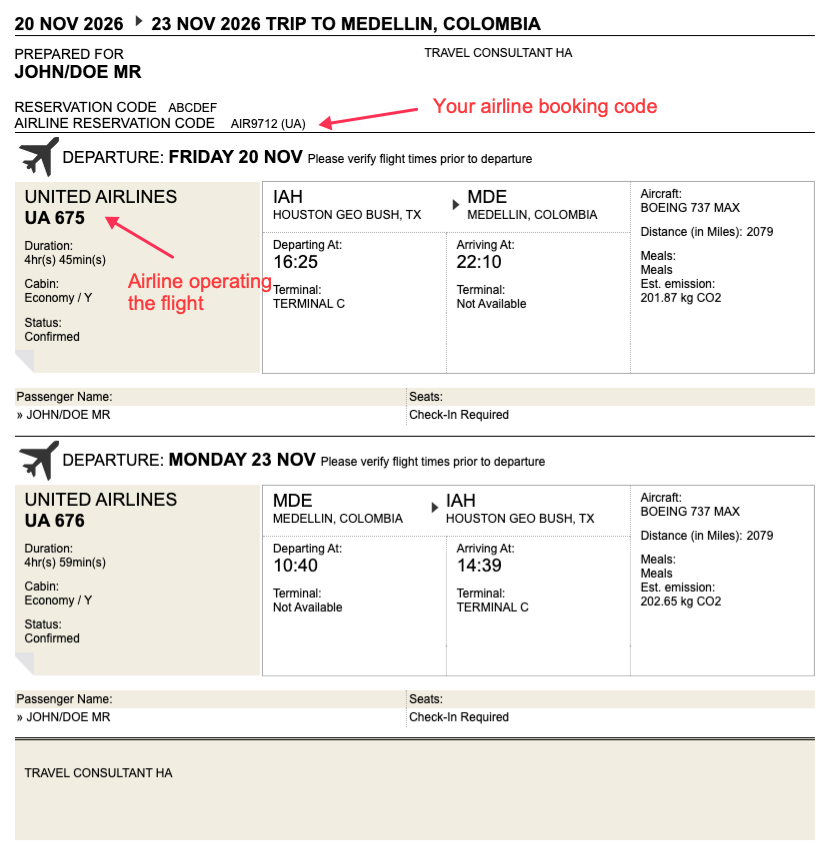
- 1
Airline reservation code is your PNR
Find AIRLINE RESERVATION CODE near the top (here AIR9712). Type exactly this into Manage Booking. Ignore the agency RESERVATION CODE, only the airline code verifies.
- 2
Your name comes from the passenger line
Passenger Name shows JOHN/DOE MR, so the last name to enter is JOHN, the part before the slash, exactly as on the passport.
- 3
Go to the operating airline site
The airline name and flight number (here UNITED AIRLINES UA 675) tell you which website to open. Always use the official airline site, never a random checker.
- 4
No ticket number needed
There is no e-ticket number anywhere on the document, and that is normal. Verification uses PNR plus surname only.
Good to know
What is a PNR?
A Passenger Name Record: the airline's file for your held booking. It is the only thing officers can look up, there is deliberately no e-ticket number on a reservation, and that is expected.
The airline site cannot retrieve my booking?
Wait a few minutes and retry with the exact surname. Some airlines restrict online display, require the first name as well, or take time to sync partner bookings. If it still fails after the steps above, email support with your booking reference, do not wait until appointment day.
Reservation validity
Reservations are temporary by design and lapse automatically (48h, 7 or 14 days depending on your order). Verify promptly and keep the window open through the day your document is checked.
Ready for a verifiable reservation?
Expert processed booking. Carefully selected itinerary. Delivered by email.